
Key Takeaways
- HubSpot CRM drives revenue when it’s built around business goals, not data tracking.
- Aligned sales and marketing teams convert faster through shared definitions inside HubSpot.
- Smart automation should prioritize buyer intent instead of routine triggers.
- HubSpot dashboards can uncover hidden revenue opportunities when designed strategically.
- A system structured for visibility and automation creates predictable, measurable growth.
Why Most HubSpot CRMs Don’t Drive Revenue
You didn’t invest in HubSpot CRM to send newsletters or track email opens. You bought it to attract qualified leads, align sales and marketing, and grow predictable revenue.
Yet most companies still use HubSpot like a digital Rolodex—lots of activity, but little movement.
According to HubSpot’s 2025 State of Sales report, 74% of companies say CRM alignment improves performance. The problem? Most businesses structure HubSpot to record actions, not to drive results. Without a revenue-first strategy, automation becomes noise instead of momentum.
HubSpot CRM only becomes a revenue generation system when Sales, Marketing, and Operations operate as one—united by shared goals, data, and automation that serves real buyer behavior.
1. How Should You Structure HubSpot Around Revenue Strategy, Not Just Setup?
You’ve got everything in HubSpot CRM set up. But it was never meant to just track leads. It should help you understand how your best clients buy and what actually moves them forward.
That’s the shift most companies skip.
Start by defining specific revenue outcomes, mapping the buyer journey, and aligning automation to reflect real buyer behavior.
Ask: What specific revenue do we want HubSpot to help us generate?
- Align automation to mirror real buying behavior.
- Identify revenue streams (new, recurring, and expansion).
- Map the buyer journey using HubSpot’s Customer Journey Analytics.
- Assign ownership across stages for accountability.
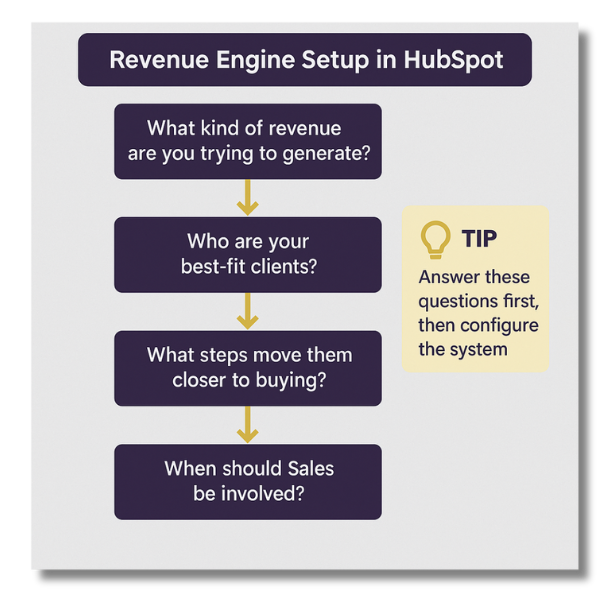
For CEOs and business owners, this is where HubSpot shifts from being a data tool to a decision engine. When your CRM mirrors your revenue process, you can pinpoint which client segments grow fastest, where deals slow down, and which campaigns actually influence revenue. That’s clarity leadership can act on.
At KLA Group, one education client transformed its admissions process by restructuring HubSpot CRM around lifecycle stages leading to record enrollment growth for the first time in 15 years.
That’s what happens when HubSpot is built around your business model, not the other way around.
If HubSpot CRM isn’t built to answer those questions, it won’t drive growth; it’ll just track tasks.
2. How Do You Align Sales and Marketing in HubSpot To Eliminate Disconnects?
Default lifecycle stages sound useful until Sales and Marketing interpret them differently.
One team marks someone “Sales Qualified” because they filled out a form.
The other only considers a lead “qualified” after a live conversation.
That disconnect breaks your funnel.
Align Around Shared Definitions:
- Define what each lifecycle stage means in your real-world sales process.
- Build automation that supports those definitions, not generic actions.
- Use internal HubSpot CRM alerts and tasks to align handoffs between Sales and Marketing.
When Sales, Marketing, and Ops all speak the same language in your CRM, leads move forward faster.
For business leaders, this means you can finally see how every department contributes to growth not just activity. HubSpot gives you the transparency to manage expectations, coach teams around the same goals, and forecast results with accuracy.
3. What’s the Smart Way To Score Leads in HubSpot Without Overengineering?
Lead scoring is one of HubSpot CRM’s most underutilized features, or worse: it’s overengineered with dozens of vague rules.
The result? Reps ignore it. And Marketing can’t tell who’s ready.
HubSpot’s AI learns from thousands of interactions to predict conversions accurately.
- Track signals: pricing page visits, demo requests, repeat sessions.
- Set thresholds that trigger alerts or tasks.
- Adjust scoring as deals evolve.
Most businesses over-engineer lead scoring. Start simple: focus on three to five buying behaviors that predict conversion.
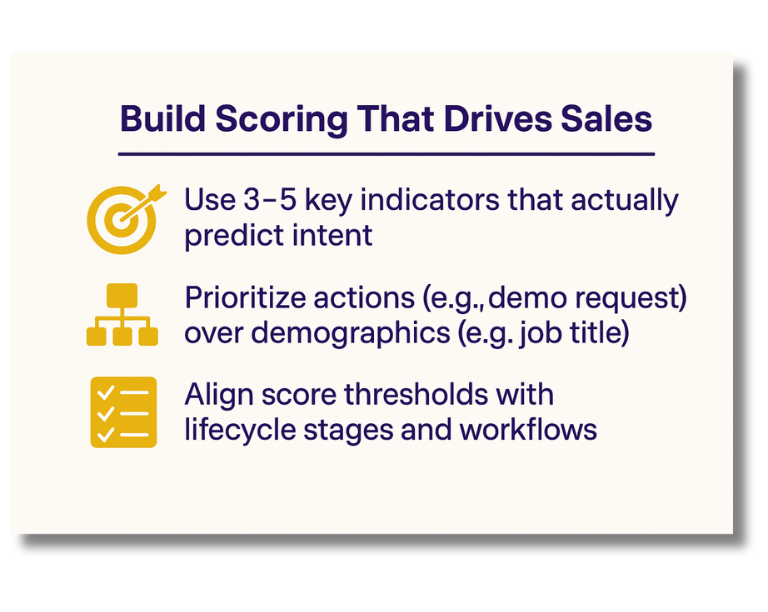
HubSpot’s scoring model should help your team work smarter, not create confusion.
4. How Can You Simplify Your CRM Content Strategy So Sales Uses It?
If your team has to go outside the HubSpot CRM to find the right message, you’re slowing down sales.
Buyers want to know:
- What happens after they sign?
- How long does onboarding take?
- What’s the return on this investment?
Best Practice: Organize HubSpot content by persona and stage for faster rep access.
HubSpot CRM empowers Sales with centralized, searchable content libraries that accelerate deals.
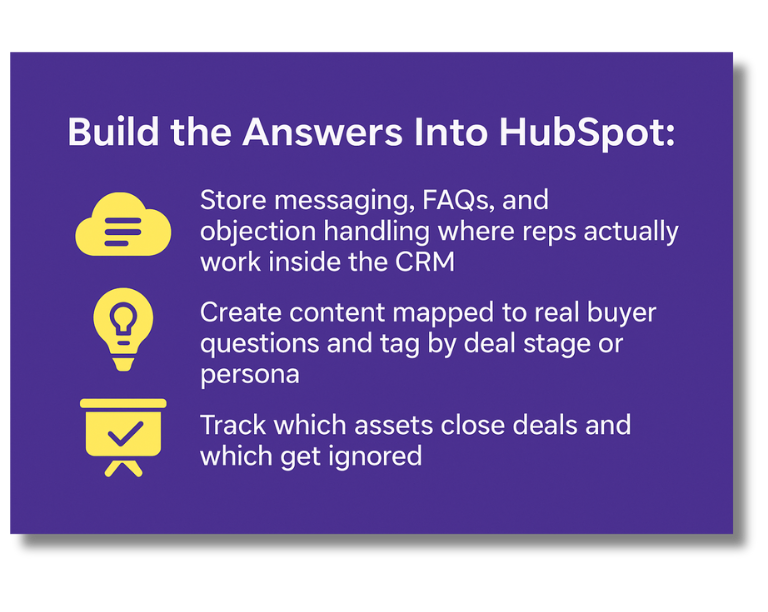
HubSpot CRM becomes more than a database when it helps Sales have better conversations.
For business leaders, that means shorter sales cycles and fewer deals falling through the cracks. When Sales has instant access to the right messaging, client confidence increases, and decisions happen faster. HubSpot turns your content from passive assets into active deal accelerators.
5. What Should Your HubSpot Dashboards Actually Be Telling You?
Are you looking at metrics or momentum?
If your dashboards track activity instead of outcomes, you’re not seeing where deals are stuck or which reps need sales coaching.
Dashboards should diagnose growth not just track activity.
- Deal velocity by source
- Conversion by lifecycle stage
- Forecast accuracy by rep or territory
- Time-in-stage analytics
That level of clarity turns HubSpot from a reporting tool into a revenue engine.
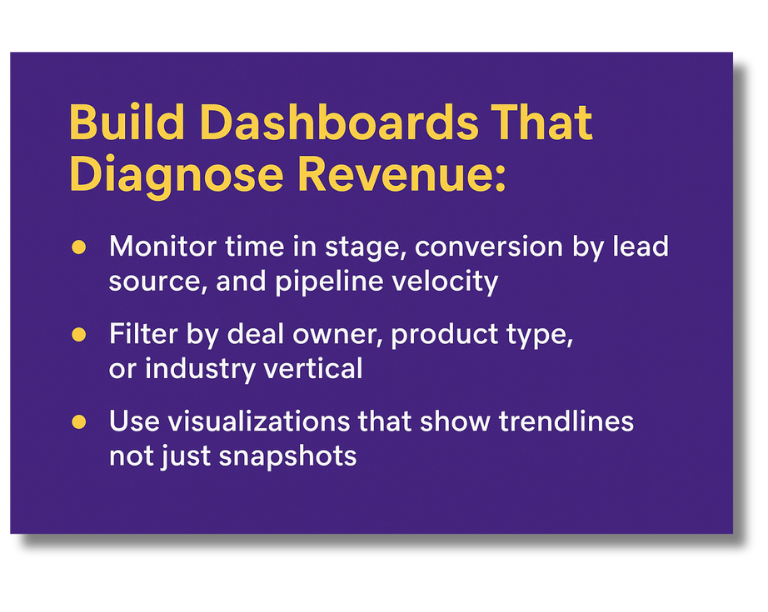
HubSpot’s reporting should help you coach better, forecast more accurately, and unblock revenue before it’s too late.
At KLA Group, we’ve seen firsthand how a thoughtful HubSpot setup turns scattered activity into consistent performance.
Real-World Use Case: Turning HubSpot Into a Growth Engine
When a private K–8 school came to KLA Group, they were struggling with manual follow-ups and inconsistent admissions tracking.
With KLA Group’s guidance, they restructured their entire admissions process inside HubSpot CRM, implementing a structured sales pipeline, improving lead follow-up, and optimizing every stage for visibility and accountability.
The impact? Their enrollment is on track to grow by 75 new students in one year, something they hadn’t achieved in 15 years.
This transformation didn’t come from new tools alone. It came from turning HubSpot into a true revenue engine, one built on process, data, and clear communication.
For business leaders, this transformation highlights what’s possible when people, process, and systems align. Growth stops being accidental and becomes measurable, repeatable, and scalable the foundation every business owner wants to build on.
Create your free HubSpot account here »
If you want help with HubSpot dashboards, from defining what to include and set up to analyzing what they’re telling you, contact us.
Frequently Asked Questions About HubSpot CRM Strategy
Q: Why isn’t HubSpot helping my team close more deals?
A: If your team isn’t closing more business with HubSpot, it’s usually because the CRM is structured around activities, not revenue. To drive sales, HubSpot CRM must mirror your actual sales process with clear lifecycle stages, lead scoring, and workflows that align with how buyers make decisions.
Q: What’s the most common mistake companies make when setting up HubSpot CRM?
A: The biggest mistake is using HubSpot’s default lifecycle stages and automation templates without customizing them to your business. When Sales and Marketing don’t share definitions or handoffs, your CRM creates confusion instead of clarity. Tailor your setup to match how your team really sells.
Q: How do I know if my HubSpot dashboards are showing useful sales insights?
A: Effective dashboards reveal deal velocity, conversion rates, and where revenue is getting stuck. If your reports only track activity counts or email opens, they aren’t helping leadership forecast or coach. Redesign reports to measure outcomes that directly impact sales performance.
Q: Can HubSpot use AI to improve lead quality and sales timing?
A: Yes. HubSpot’s AI and behavior-tracking tools surface powerful buyer signals, such as pricing page visits, document opens, and form abandonment. These insights help Sales prioritize high-quality leads and engage them at the right time to improve close rates.
Q: Do I need to rebuild HubSpot, or can I fix what we already have?
A: Most companies don’t need to start over. You can transform your existing HubSpot instance into a true revenue engine by realigning lifecycle stages, simplifying automation, and rebuilding dashboards to reflect business performance and growth metrics.
Q: How do I fix lead quality problems inside HubSpot CRM?
A: Simplify your lead scoring model to focus on behavioral triggers, like pricing page views or content engagement. Align lifecycle stages with your real sales process, so only qualified leads reach Sales, and automate disqualification for contacts who show no buying intent.
Q: What is the right way to use lifecycle stages in HubSpot for B2B sales?
A: Define lifecycle stages based on specific buyer actions, not assumptions. For example, a Marketing Qualified Lead (MQL) should meet clear engagement criteria, and a Sales Qualified Lead (SQL) should be validated by your sales team. Avoid using default stages without internal agreement.
Q: How can I use HubSpot automation to accelerate my sales process?
A: Use automation to trigger alerts, assign tasks, and deliver relevant content when prospects show strong buying signals. Avoid overautomating outreach. Instead, focus on automating internal workflows that reduce delays, improve follow-up speed, and keep deals moving efficiently.
About Kendra Lee
Revenue generator and founder of KLA Group, Kendra Lee helps small and mid-sized companies grow revenue by getting seen, getting heard, and getting traction, with sales, marketing, and AI strategies that cut through the noise. She’s the author of The Sales Magnet, with her third book, Building a Revenue Generating Engine, coming January 2026.
Affiliate Disclosure: Some of the links on this page are affiliate links. If you click through and make a purchase or sign up for HubSpot products, KLA Group may receive a commission at no extra cost to you. We recommend only those products and services we truly believe will add value to your business.
Read More Related Articles