
If you have been exploring HubSpot CRM as a possible platform for your sales or marketing teams, you already know it offers powerful tools. HubSpot provides automation, analytics, forecasting, email, calling, and highly intuitive dashboards that make life easier for growing companies.
That same breadth can also feel overwhelming when you first decide to adopt it. Many companies become excited about everything HubSpot can do and decide to implement all of it at once, which leads to stalled rollouts and frustrated teams.
This article explains the wrong way to start with HubSpot and shares three better ways that reflect real examples from KLA Group clients. These approaches show how to start affordably, reduce overwhelm, and achieve success more quickly. These recommendations apply whether you are exploring HubSpot for inbound marketing, CRM software consolidation, sales automation, or broader revenue operations support.
Key Takeaways
- Trying to implement all of HubSpot at once is the wrong way to start and typically causes delays, confusion, and low adoption.
- Beginning with a single business problem, not the full platform, creates fast wins and team confidence.
- Three proven entry paths include integrating HubSpot with existing systems, deploying HubSpot for one division, or using HubSpot to eliminate manual sales tasks.
- Choosing the right HubSpot tier depends entirely on the challenge you want to solve first, not every feature available.
- A phased approach helps companies stay affordable, move faster, and expand intentionally as processes mature.
What Is the Wrong Way To Start With HubSpot?
The wrong way to start with HubSpot is adopting every tool, hub, and feature at the same time. HubSpot CRM includes Sales Hub, Marketing Hub, Content Hub, Operations Hub, customer communication tools, automation engines, reporting, forecasting, calling, and integrations. Deploying all of these elements at once turns the implementation into a technical project instead of a strategic one.
Teams implementing everything from day one experience slower adoption because they must learn too many processes simultaneously. This creates confusion around what to use, when to use it, and how different tools work together. At KLA Group, we see companies become overwhelmed when they focus on HubSpot’s capabilities instead of the business problem they want to solve.
Why Does Trying To Do Everything at Once Backfire?
Trying to implement everything at once backfires because it creates complexity, slows decision making, and reduces the likelihood that teams will fully adopt the platform. Most companies see meaningful improvements in follow-up consistency and pipeline clarity within the first 30–60 days when they start with a focused HubSpot rollout instead of a full buildout.
HubSpot offers a wide range of features, but most teams do not need all of them to solve their initial challenges. A rollout that attempts to use every tool immediately demands significant time from sales, marketing, and leadership teams.
Teams that feel overwhelmed by too much change struggle to stay consistent. A phased approach simplifies decision making by introducing only the features that support the company’s immediate goals. This reduces resistance, boosts confidence, and allows the organization to build processes incrementally.
At KLA Group, we guide companies to define the outcome they want before choosing any HubSpot tier or tool. This keeps the implementation manageable and affordable.
How Do Successful Companies Begin With HubSpot?
Successful companies begin by choosing a single entry point into HubSpot that aligns with their most urgent business need. They select the HubSpot tier that supports that specific goal, implement that part well, and expand later.
1. How Can HubSpot Streamline Sales Without Replacing Existing Systems?
The Integration-First Approach
HubSpot can streamline daily sales activity by integrating with existing systems instead of replacing them. This strategy is ideal when your sales team uses multiple disconnected tools or when your current CRM is embedded inside a service platform you cannot remove.
One KLA Group client had a CRM built into their service delivery system. Their sales reps worked across several screens to find customer information. They dialed manually, researched before every call, and pieced together data from multiple locations. This fragmented workflow cost time and created inconsistency.
HubSpot Sales Hub Enterprise offered automation, click-to-call functionality, integrated notes, and task reminders giving reps one interface for daily activity. By pairing this with Marketing Hub Pro, the client gained lightweight nurturing, consistent email templates, and automated follow-up. HubSpot CRM became their centralized workspace while the service system delivered data through integration.
The integration-first approach allowed the team to modernize without dismantling the system their operations relied on. HubSpot dashboards provided leadership with clear visibility, and reps gained a simpler, faster workflow. This method delivered meaningful improvements without a disruptive system replacement.
2. Can HubSpot Support Only One Division Inside a Larger Company?
The Division-First Approach
HubSpot can support a single division even when the broader company uses a different CRM such as Salesforce. This is a powerful option when one team sells differently or requires visibility that the corporate CRM does not provide.
Another KLA Group client belonged to a corporation that used Salesforce for all divisions. Their specific team needed different metrics, different workflows, and different CRM fields. Salesforce was customized for the entire organization, not for their unique sales cycle. They lacked accurate forecasting and could not track daily activity.
HubSpot solved these challenges because Sales Hub Pro is flexible and easy for reps to adopt. The division gained customized pipelines, automated tasks, clean reporting, and a CRM that matched their process. HubSpot integrated at a high level with Salesforce so that corporate systems remained intact.
Leadership gained immediate clarity through HubSpot CRM dashboards. Reps adopted the platform quickly because it was intuitive. Pipeline meetings improved because everyone saw the same real-time data. This division-first approach allowed one team to operate effectively without disrupting corporate systems, and it naturally led to consideration of broader HubSpot use.
3. How Does HubSpot Reduce Manual Sales Work?
The Manual-to-Automated Approach
HubSpot reduces manual work by automating follow-up, standardizing data entry, and organizing tasks. This approach is ideal when teams rely on handwritten notes, spreadsheets, or repetitive manual steps.
A third KLA Group client collected business cards, added contacts manually, and followed up based on memory. Their CRM required too many clicks, so reps avoided using it. As a result, opportunities slipped through the cracks.
HubSpot CRM solved this problem through Sales Hub Pro, which automated tasks, reminders, and follow-up sequences. Reps logged activity automatically and added contacts quickly. Marketing Hub Starter provided simple email templates, web forms, and light nurturing.
This modest, focused implementation produced immediate time savings. Reps had a clear daily workflow. Managers had visibility into activity. The team built confidence using HubSpot CRM before moving into more advanced automation.
Why Should You Start With the Business Problem Instead of the Platform?
You should start with the business problem because HubSpot’s value becomes clear only when it solves an obstacle that slows your revenue team. A technology-first rollout creates complexity, but a problem-first rollout creates measurable results.
Every HubSpot implementation at KLA Group begins by asking a single question: What is creating the most friction for your team today? The answer points directly to the right starting hub, whether that is Sales Hub Pro, Marketing Hub Starter, or another combination. HubSpot is a platform designed to scale gradually, which makes it ideal for companies that want to grow intentionally.
How Do You Choose the Right HubSpot Tier?
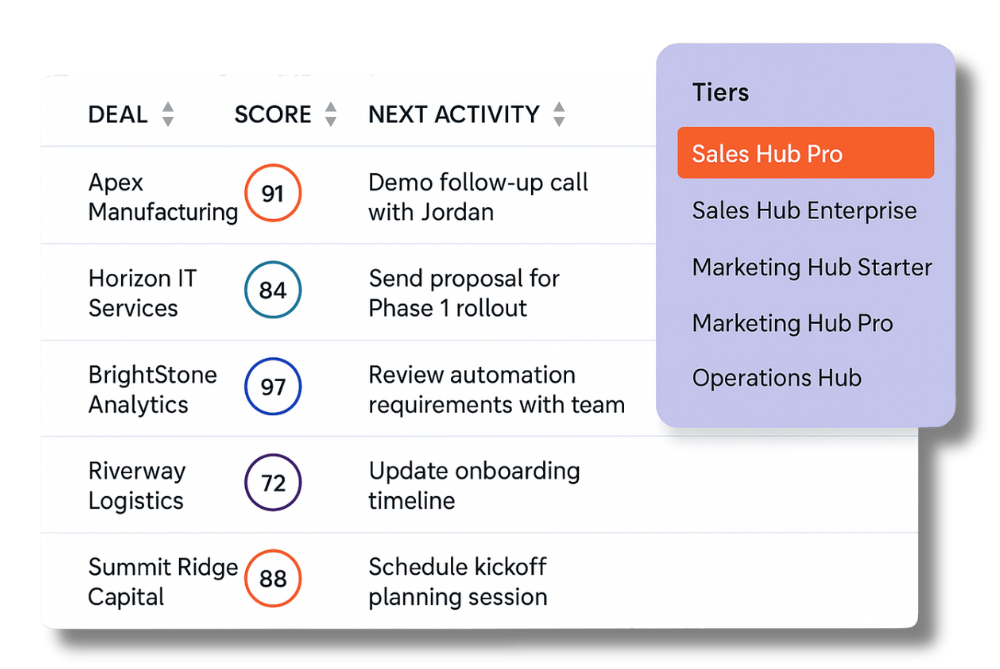
Choosing the right HubSpot tier depends on the business challenge you want to solve first. Each tier provides tools that support different levels of automation, visibility, and integration.
Sales Hub Pro supports automation, forecasting, reporting, sequences, and task management. This tier is the best starting point for most mid-sized revenue teams.
Sales Hub Enterprise adds advanced permissions, predictive forecasting, custom objects, and deeper integration capabilities for companies with multiple teams or complex structures.
Marketing Hub Starter provides forms, emails, lists, and simple nurturing.
Marketing Hub Pro expands into segmentation, automation workflows, and campaign analytics for teams ready to scale marketing.
Operations Hub supports system integrations, data syncing, and data transformations, which benefit teams relying on multiple business systems.
Selecting the right tier is not about buying every capability. Instead, it is about choosing the tools that best support your current workflow and goals.
What Is the Best Way To Roll Out HubSpot in Phases?
Rolling out HubSpot in phases is the best approach because it keeps the implementation manageable and supports fast adoption.
A phased rollout includes three steps:
- Solve one meaningful problem first. Use HubSpot CRM to address the most urgent friction.
- Demonstrate early wins. Show how HubSpot improves efficiency, visibility, or follow-up.
- Expand gradually. Add Marketing Hub or Operations Hub when the team is ready.
This approach keeps your implementation affordable and aligned with your team’s available time. HubSpot’s design supports gradual adoption, making it easy to expand once the foundation is solid.
Create your free HubSpot account here »
Avoid the Wrong Start and See Real Results With HubSpot CRM
Starting HubSpot the wrong way creates frustration and delays. Starting the right way creates confidence, momentum, and measurable outcomes. HubSpot CRM helps teams streamline workflows, improve visibility, and adopt modern sales practices when the rollout reflects business priorities.
KLA Group helps companies design HubSpot CRM implementations that are manageable, affordable, and aligned with real revenue goals. We work with you to select the right tools and launch in phases so your team sees fast value. If you want to start HubSpot CRM the right way, KLA Group can help.
FAQs About Starting With HubSpot
Q. What is the biggest mistake companies make with HubSpot?
A. The biggest mistake companies make is trying to implement every tool immediately. Starting with one problem and one Hub produces faster results and stronger adoption.
Q. How do you choose the right HubSpot tier?
A. You choose the right tier by identifying the process you want to improve. Sales Hub Pro supports pipeline visibility. Marketing Hub supports simple lead capture. KLA Group helps clients map needs to tools.
Q. Can you start with HubSpot Sales Hub only?
A. Yes. Many organizations begin with Sales Hub and use the free HubSpot CRM features as the foundation. Marketing Hub and Content Hub can be added later.
Q. How long does a HubSpot rollout take?
A. A narrow rollout takes 30–60 days when focused on one hub and one business problem.
Q. Does HubSpot integrate with other systems?
A. Yes. HubSpot offers native integrations and API-based integrations for CRM, ERP, email, ticketing, and custom platforms.
Q. Why would a company use HubSpot if they already have Salesforce?
A. HubSpot CRM is often easier for specific divisions that require unique workflows. HubSpot supports division-level autonomy while integrating with Salesforce at a high level.
Q. What if no one has time to manage HubSpot?
A. KLA Group helps companies configure HubSpot, train users, and manage the initial rollout so adoption stays easy.
Q. How much should we expect to invest?
A. Many companies begin with Sales Hub and optional Marketing Hub. Investment grows only when capabilities expand.
Q. What results do companies typically see?
A. Companies see faster follow-up, clearer pipelines, and better accountability after HubSpot CRM adoption.
Q. How do we avoid starting the wrong way?
A. Identify the most important friction point first. Match the HubSpot solution to that need. KLA Group can guide this process.
About Kendra Lee
Revenue generator and founder of KLA Group, Kendra Lee helps small and mid-sized companies grow revenue by getting seen, getting heard, and getting traction—with sales, marketing, and AI strategies that cut through the noise. She’s the author of The Sales Magnet, with her third book, Building a Revenue Generating Engine, coming January 2026.
Affiliate Disclosure: Some of the links on this page are affiliate links. If you click through and make a purchase or sign up for HubSpot products, KLA Group may receive a commission at no extra cost to you. We recommend only those products and services we truly believe will add value to your business.
Read More Related Articles